
Krea 2 Prompt Guide: Write Better Prompts for Photoreal Images
Learn the Krea 2 prompt stack: subject, composition, lighting, style, crop, and one-variable iteration. Includes copy-ready examples.

Write a better Krea 2 prompt in this order every time: subject + context + composition + light + style + crop. This page teaches that stack and one-variable iteration. For copy-ready templates, open Krea 2 prompts. Product definition and the speed-tier map live on what Krea 2 is. Photoreal subject workflows live in photorealistic images with Krea 2.
A weak prompt creates flat images even when the model is strong. Krea 2 rewards prompts that read like a short shot brief, not a keyword salad. This page is the prompt-craft spoke in the docs cluster. The unique job is wording order, control language, and iteration hygiene.
A prompt stack is the ordered set of control fields you write every time: subject, context, composition, light, style, crop. A one-variable revision is an iteration that changes only one of those fields so you can see what improved.
Direct answer: A reliable Krea 2 prompt starts with the required subject and action, then adds setting, camera distance and angle, light, medium, palette, and crop. Keep requirements ahead of optional style language, and change one field between renders so you can identify what improved.
Want the stack assembled for you? Open the Krea 2 prompt generator, edit the prefilled subject and setting, then copy the result or carry it into the live generator.
Copy this starter prompt
| Job | Starter |
|---|---|
| Portrait | A calm editorial portrait of a young woman at golden hour, soft rim light, shallow depth of field, pastel wardrobe, 3:4 crop for social profile |
| Product | A matte ceramic skincare jar on a sculpted stone plinth, seamless warm-grey backdrop, soft directional key light with gentle rim highlight, 4:3 hero crop |
| Scene | A rain-slicked city alley at night, neon reflections on wet asphalt, low camera angle, cinematic wide shot, 16:9 crop |
Paste one starter into the generator, swap only the subject first, then revise light or crop one field at a time.
That purpose-first split follows Google's helpful content guidance: one URL, one job.
Key Takeaways
- Lead with a concrete subject before style adjectives.
- Write prompts as a stack: subject, context, composition, light, style, crop.
- Lighting and lens language create more photoreal gains than long adjective lists.
- Match crop to the publish channel before you refine mood.
- Iterate with references by changing one variable at a time.
- Use other cluster guides for tiers, photoreal subject tactics, and packaging jobs.
What good Krea 2 prompts optimize for
| Prompt style | What it produces | When it fails |
|---|---|---|
| Keyword soup | Average, over-decorated stills | No hierarchy, no shot grammar |
| Subject-first stack | Stable anchors for light and crop | Needs deliberate control fields |
| Style-only fluff | Pretty but unusable direction | No subject, no commercial crop |
| One-variable revision | Converging keepers | Slow if the first stack is vague |
Text-to-image systems improved surface fidelity fast, but composition and controllable editing remain hard (Zhang et al., arXiv 2025; Croitoru et al., diffusion survey). Your prompt is the cheapest control layer available before a reshoot.
Rule 1: Lead with the subject, then layer context
State the subject plainly first. Then add wardrobe or material, then place, then mood. Concrete nouns beat atmosphere adjectives when the model has to decide what fills the frame.
Weak:
beautiful cinematic aesthetic moody atmospheric photoreal masterpiece
Strong:
A weathered fisherman in an oilskin coat, standing on a wet harbor pier at dawn, distant trawlers soft in the background
If you cannot point at the noun someone must recognize in one second, the prompt is not ready.
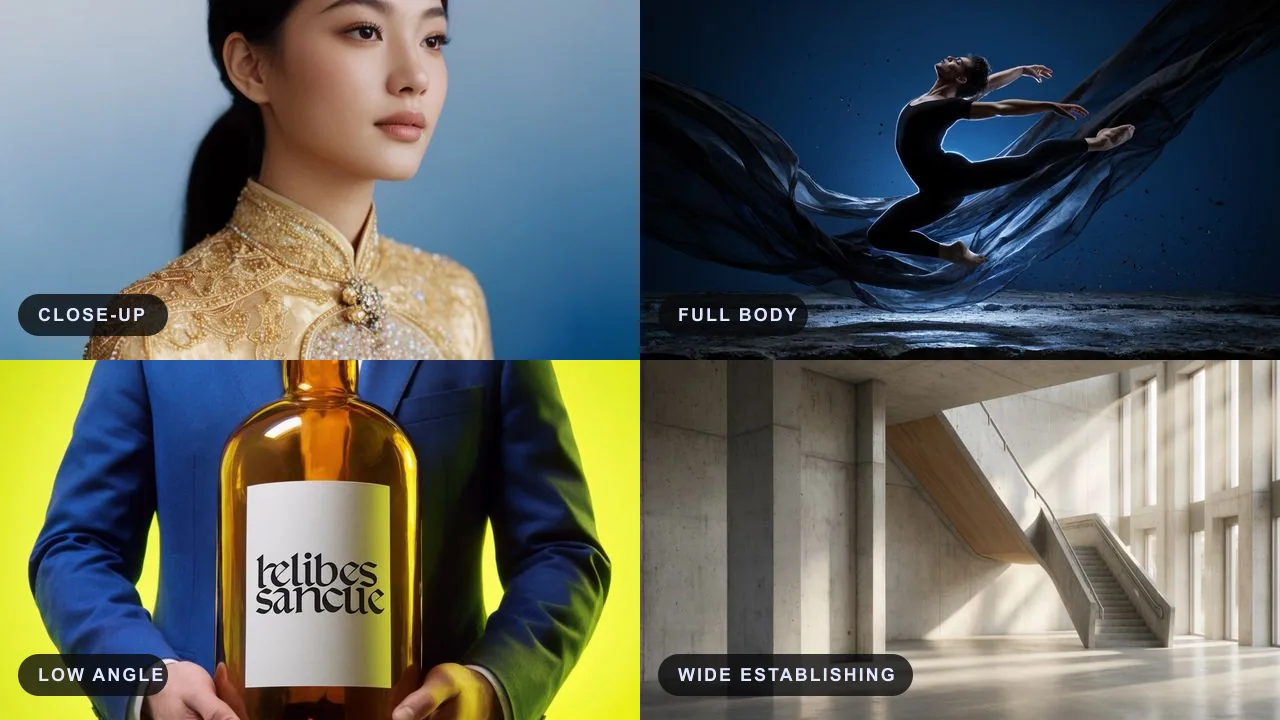
Rule 2: Direct the composition with camera language
Tell the model how to frame before you decorate:
- Shot size: extreme close-up, portrait, three-quarter, full body, wide establishing
- Angle: eye level, low angle, high angle, top-down
- Lens feel: 35mm environmental, 50mm natural, 85mm portrait, shallow depth of field
- Placement: rule of thirds, off-center, negative space left or top
Low-angle 85mm portrait of a dancer mid-leap, shallow depth of field, soft bokeh, negative space top-right, 3:4
Composition is packaging. Product heroes, covers, and posters all fail when the subject lands dead-center by accident. Packaging-focused guides such as the poster guide and cover guide depend on this same framing discipline.

For wider and full-body compositions, combine three signals instead of relying on one camera keyword:
- Distance: camera farther from the subject, wide establishing frame.
- Completeness: subject visible from head to toe, feet inside the frame.
- Placement: smaller subject scale with readable environment and deliberate foreground/background separation.
For multiple people, name each person’s position and action separately. “Two people in a room” is ambiguous; “one person seated in the left foreground, a second person standing near the right doorway” gives the model a spatial plan.
Rule 3: Make lighting the primary quality lever
Light is where photoreal prompts are usually won or lost. Name source, direction, and quality:
- Quality: soft diffused light, hard directional light, overcast, golden hour, blue hour
- Direction: front, side, back, rim, top
- Mood register: low-key, high-key, warm tungsten, cool daylight
Ceramic teapot on a marble counter, soft window light from the left, faint rim light on the spout, calm editorial still life, 1:1
If the render looks flat, revise light first. Color grades rarely fix dead illumination.
Rule 4: Set medium, detail register, and color grade
After hierarchy and light, declare the medium and the fine-detail budget:
- Medium: photograph, cinematic film still, oil painting, product render, matte illustration
- Detail cues: skin pores, fabric weave, dust in the beam, micro-reflections, condensation
- Grade: warm cinematic, muted earth, high-contrast mono, teal and amber
Cinematic film still of a neon alley after rain, reflections on wet asphalt, fine atmospheric haze, teal-and-amber grade, 16:9
Detail cues should support the subject. Do not dump every texture word into every prompt.
Rule 5: Choose crop before the final style pass
Aspect ratio changes composition. Match the first publish channel early:
| Crop | Common jobs |
|---|---|
| 1:1 | product cards, album art, feed posts |
| 3:4 | portraits, book covers, editorial cards |
| 9:16 | stories, vertical promos, status frames |
| 16:9 | banners, key art, cinematic stills |
| 4:3 | decks, some print adaptations |
A beautiful 16:9 plate rarely becomes a good story cover without a recompose. Crop is a prompt field, not a late export accident. Ratio families used in print and display work are documented in practical size references (poster size chart; print aspect ratios guide).
Rule 6: Iterate with references, one variable only
When a frame is close, stop re-rolling the whole brief.
Use this testing method:
- Freeze the subject line.
- Change only light, only angle, only wardrobe, or only grade.
- Keep winners as references for the next pass.
- Reject changes that improve style but break the commercial crop.
- Promote the winner into package-specific checks (poster, cover, quote, photoreal workflow).
For explore-stabilize-finalize economics, use the shared tier map on the product hub rather than relearning tiers here.
When palette, texture, or lighting is easier to show than describe, use the Krea 2 image-to-image tool. Treat the upload as style guidance: it does not promise to preserve the same face, exact text, pose, or product geometry.

Reusable prompt templates
Photoreal portrait
A [shot size] portrait of [subject] in [wardrobe], [setting], [lighting], [lens feel], [skin or material detail], [color grade], [crop]
Cinematic scene
A cinematic film still of [scene], [time of day], [lighting], [atmosphere], [camera angle], [color grade], [crop]
Product / still life
A [studio or location] product shot of [object] on [surface], [lighting direction and quality], [reflection control], [detail cues], [crop]
Environment concept
Establishing view of [place], [weather], [light path through volume], [scale cue], [lens], [palette], [crop]
Package plate for type later
[Genre scene], [silhouette-friendly subject], [light], [reserved calm mass for title or quote], [crop]
Fill the brackets with nouns and measurable light. Leave brand typography for layout tools when the line must be perfect.
Prompt review checklist
Before you generate a batch:
- subject noun is unmistakable
- composition and crop match the first channel
- light has source and quality language
- style words do not bury the subject
- detail cues match medium (portrait vs product vs environment)
- series work has a frozen reference when continuity matters
- commercial packaging needs handoff to poster, quote, or cover checks
- rights and account questions can go through contact
If frames feel over-smooth or plastic after the stack is correct, diagnose surface artifacts with references such as the ZSky artifacts guide. If you are still deciding whether Krea 2 is the right generator at all, use the comparison guide.
Common failure modes and fixes
| Failure | Cause | Fix |
|---|---|---|
| Pretty but empty | Style adjectives first | Rewrite with a subject-first stack |
| Flat photoreal claim | No light language | Name source, direction, quality |
| Wrong crop family | Style finished before ratio | Set crop as part of the prompt |
| Drift after revision | Multiple variables changed | Reference lock; change one field |
| Good image, bad package | No safe mass for type | Add quiet zone or title mass language |
Hierarchy language from campaign art references still helps here: dominant motif, intentional empty areas, readable contrast (movie poster anatomy overview). Quote cards especially need quiet-zone language from the quote guide.
FAQ
How long should a Krea 2 prompt be?
Long enough to lock subject, composition, light, style, and crop. Extra adjectives after those fields usually add noise. A useful target is one clear sentence stack, not a paragraph of synonym stuffing.
What is a good Krea 2 prompt length?
Good Krea 2 prompts are short enough to stay hierarchical and long enough to name subject, place, camera, light, style, and crop. If a line only adds mood words after those six fields are set, cut it.
Should I front-load quality words like masterpiece?
No. Lead with the subject and shot grammar. Quality words without hierarchy rarely raise usable control.
Do I need negative prompts?
This Krea 2 workflow has no separate negative-prompt field. Only add a short, concrete exclusion after a clear positive stack fails on a repeatable defect. Fixing subject order, camera, and light first is cleaner than a long generic ban list.
How is this different from the photoreal workflow guide?
This page owns wording order and control language. The photoreal spoke owns subject tactics, texture checks, and review loops for faces, products, and environments.
Where do speed tiers fit?
In the explore-stabilize-finalize path on the product hub. Keep this page on prompt craft.
Bottom line
Better Krea 2 prompts are brief, ordered, and revisable:
- subject first
- composition next
- light as the quality lever
- style and detail as register, not filler
- crop matched to channel
- one-variable reference iteration
Open the Krea 2 prompt generator, edit a prefilled stack, and revise by column rather than by luck. For reusable templates, browse Krea 2 prompts. When a visual reference should carry the look, continue with Krea 2 image to image; for subject-specific photoreal checks use the photoreal workflow guide.